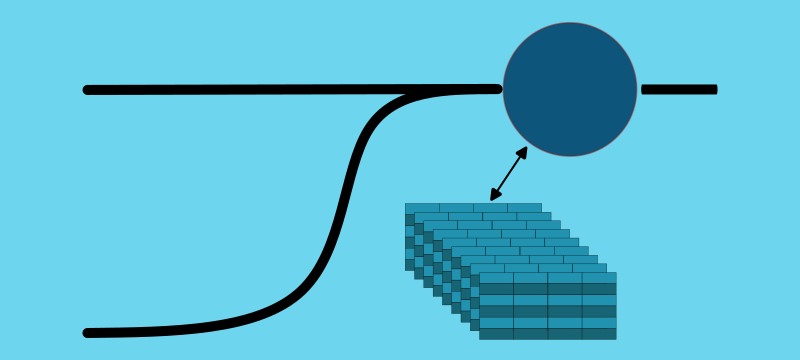
A demonstration of leveraging a stream to versioned-table join in Kafka Streams.
Introduction
Versioned tables have the same topology and join syntax as standard tables. I recommended you read the previous article on stream-to-table joins. This article shows how versioned tables provide additional guarantees when building stateful processing.
If you have strict timestamp semantics where the table’s timestamp must be earlier than the stream’s timestamp, versioned tables are the way to go. If you want to replay events and have a 100% guarantee that the joins behave exactly the same, versioned tables are for you. If those guarantees are not important, continue using non-versioned tables for better performance.
We compared versioned and non-versioned tables. We also look at how Kafka Streams leverages RocksDB and how it configures the changelog topics. Knowing this is important to ensure your application remains performant.
Additional Resources
This article helps you see versioned state stores in action and gives you tools and insights to explore them yourself. If you want to learn more about the implementation, check out these KIPs: KIP-889 and KIP-914. There is also a great introduction, by Confluent.
The Demo Application
The demo application used for this article (and all Bite-Size Streams articles) emits events from local operating system processes and windows.
The demo application adds an iteration attribute to each event, which makes the event ordering easier to understand.
The source code is available on GitHub.
Stream-To-Versioned-Table Join Algorithm
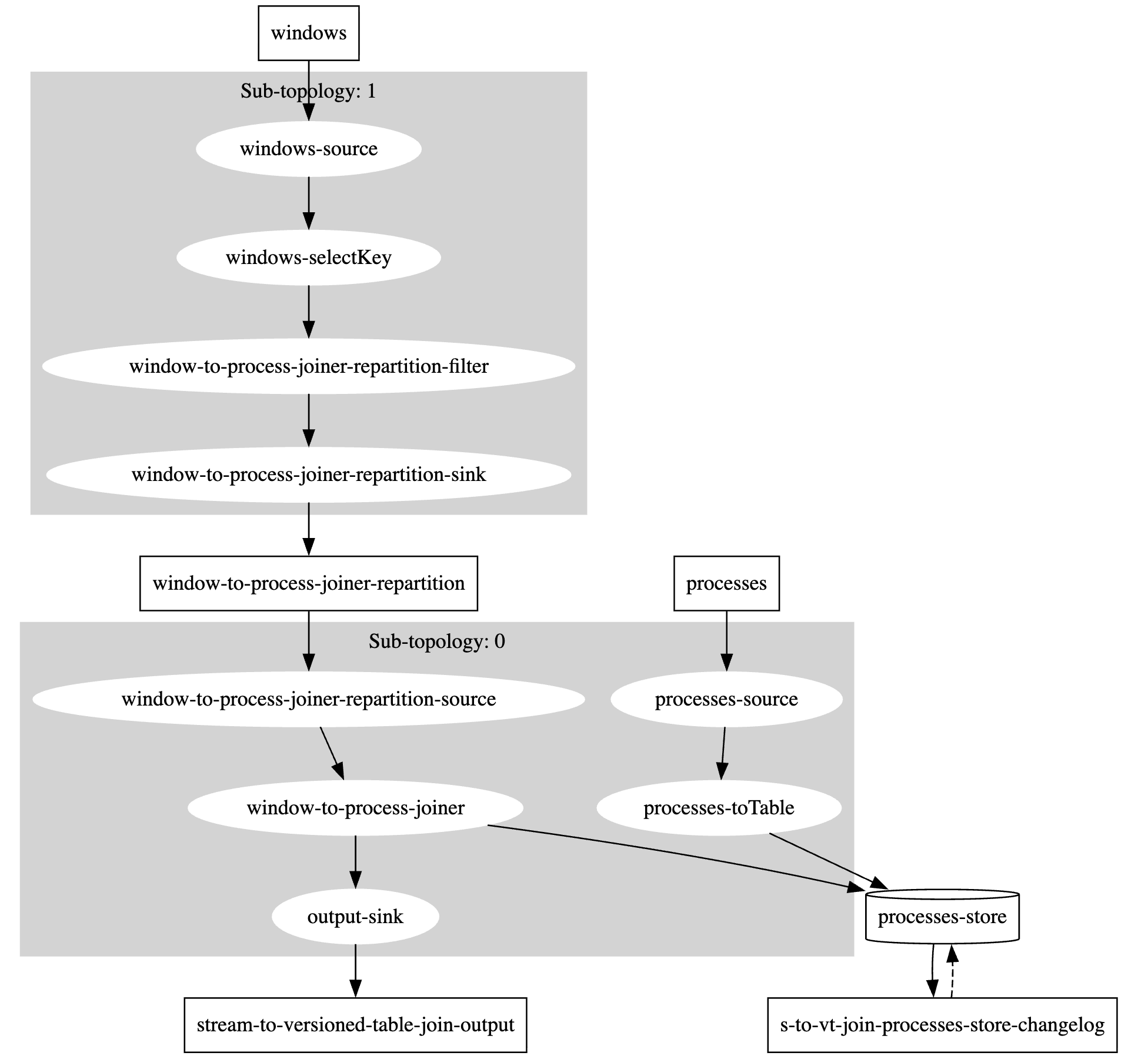
This tutorial defines the topology in StreamToVersionedTableJoin. This topology is identical to the stream-to-table join topology. The only difference is that the state store is versioned, which is not visible in the topology.
Topology
Source Code
The creation of the store where versioned tables are defined.
As a developer this is all you have to do, with the only decision is retention period; the period of time to retain previous versions.
If you need control over how records are stored within RocksDB, an additional duration value is available on the persistentVersionedKeyValueStore method.
For the sake of the examples and the demo application, the default segment calculations are used.
  protected void build(StreamsBuilder builder) {

    KTable<String, OSProcess> processes = builder
            .<String, OSProcess>stream(Constants.PROCESSES)
            .toTable(
                Materialized.as(
                    Stores.persistentVersionedKeyValueStore(
                        "processes-store",
                        Duration.ofMinutes(30)
                        // segment size duration can be supplied here
                    )
                )
            );

    builder.<String, OSWindow>stream(Constants.WINDOWS)
            .selectKey((k, v) -> "" + v.processId())
            .join(processes, StreamToTableJoin::asString)
            .to(OUTPUT_TOPIC, Produced.with(null, Serdes.String()));
  }

  private static String asString(OSWindow w, OSProcess p) {
    return String.format("pId=%d(%d), wId=%d(%d) %s",
            p.processId(),
            p.iteration(),
            w.windowId(),
            w.iteration(),
            rectangleToString(w)
    );
  }

  private static String rectangleToString(OSWindow w) {
    return String.format("@%d,%d+%dx%d", w.x(), w.y(), w.width(), w.height());
  }
Key Implementation Details
- Changelog-topic compaction does not occur until the retention period expires.
- The RocksDB key-value store becomes more complex, with potentially multiple entries per key and values that contain more than one record.
Demonstration
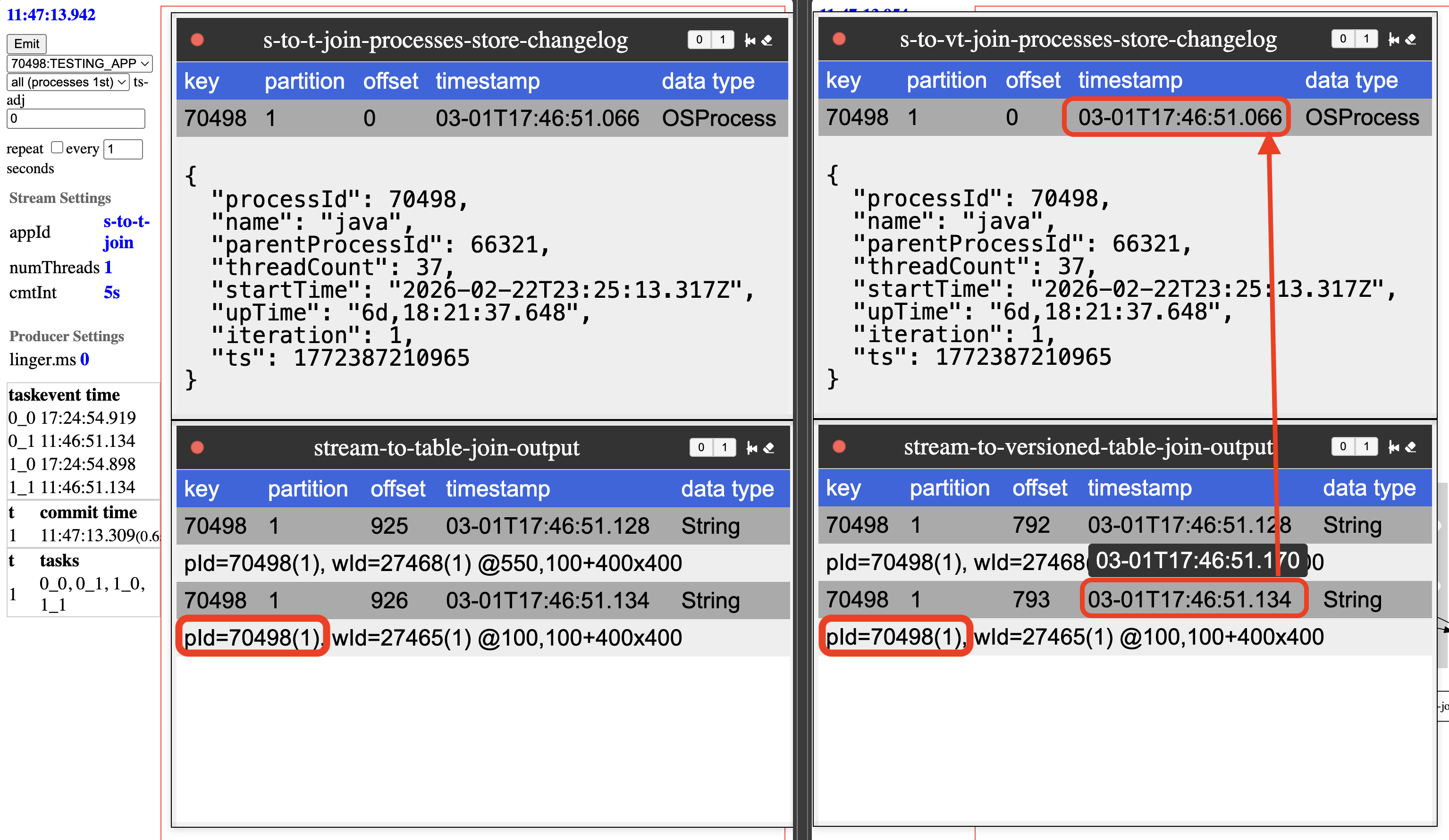
The best way to demonstrate a stream-to-versioned-table join is to compare its behavior to a stream-to-table join. The left side of the diagram is the stream-to-table join, and the right side is the stream-to-versioned-table join.
Scenario 1: Process Events First
In this scenario, every time window and process events are emitted from the laptop, the process events are sent first. In both cases the non-versioned process table and the version process-table joins the same way. Looking closely at the timestamps, it is clear that the process event is newer than the window event.
Scenario 2: Window Events First
In this scenario, the window events are emitted first.
In the non-versioned process table, the join is still with the process from the same iteration.
This was explained in the previous bite-size article of stream-to-table joins.
In the versioned process table, the process event’s timestamp is used to determine which version of that event is to be joined.
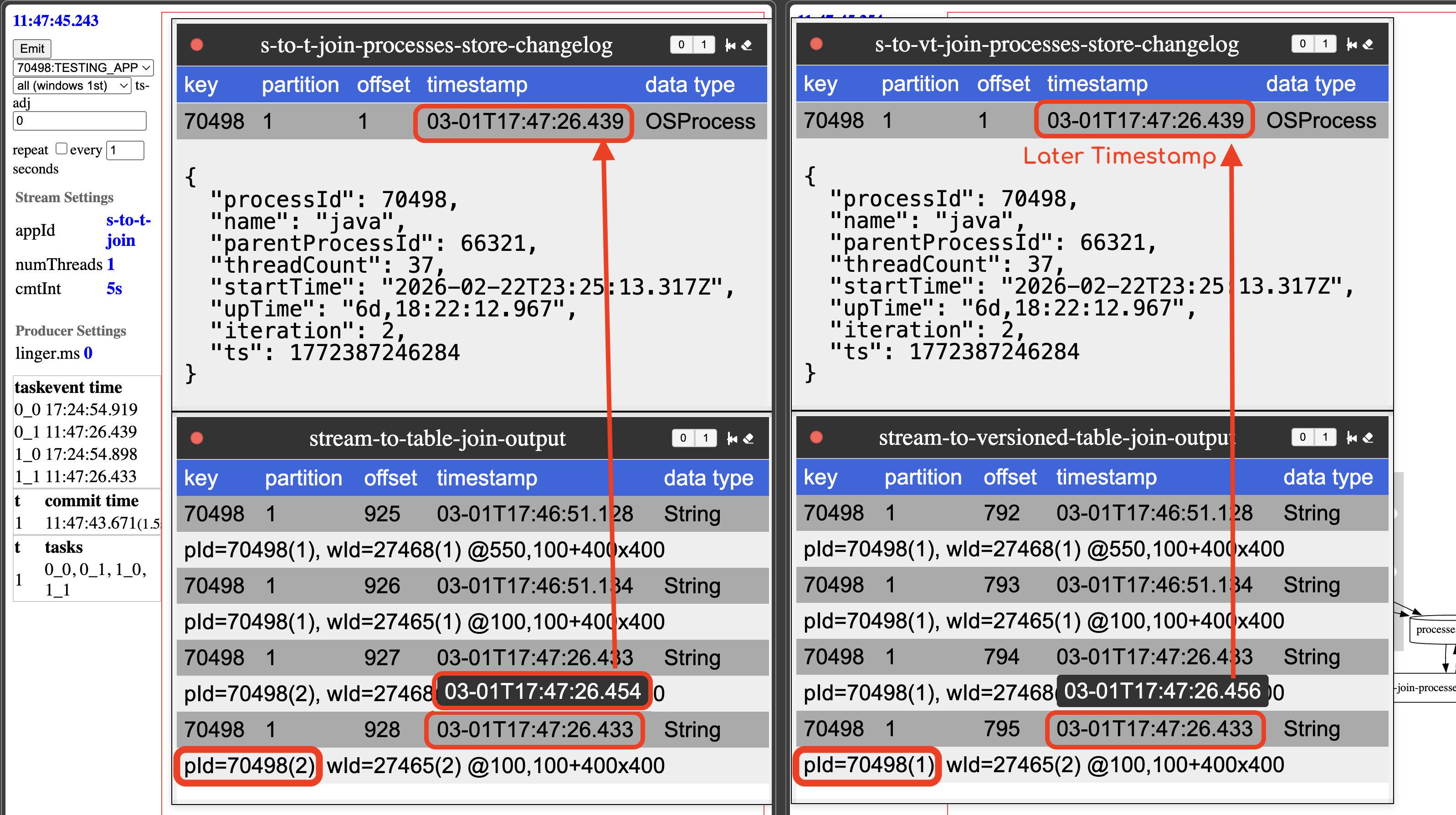
Looking closly at the timestamps, it is clear that the process event is newer than the window event. Even though
the event is later (due to the repartition step), the timestamps of the event is used to join with the process event
that is at that point in time.
In this scenario, the versioned table behaves differently than the standard table. Versioned tables will read the table event for the time of the event.
Implementation Details
Durability (change-log topic)
How does Kafka Streams manage durability?
At first glance it appears complicated; compaction used by changelog topics is only required to maintain the most recent version of a key.
There is a Kafka topic configuration to handle this: delayed compaction.
Adding a topic configuration of min.compact.lag.ms will ensure compaction doesn’t happen for the retention period.
The value that Kafka Streams sets this to is the retention time of the state-store + 24 hours. The 24 hours is hard-coded, but you can change this configuration manually. The additional time is to ensure restoration and reprocessing possibilities.
If you describe versioned change-log topic, you will see the following attributes:
cleanup.policy=compact
min.compaction.lag.ms=88200000  # 24 hours + retention time
Durability of the state-store is implemented with a single Kafka topic configuration, how cool is that? Why is it important to know this implementation detail? The size of this topic can grow significantly, if keys are updated often; even with a short retention span, due to the additional day of retention.
Availability (RocksDB implementation)
Compacted topics are not queried, so their state is put into a performant key/value store. With more than 1 version of the same key stored, so how is this implemented? This is done through specialized prefixes added to the keys.
The key is an additional timestamp based prefix.
This additional long is a “rounded timestamp” called a segment.
The length of the segment is determined by the size of the retention period, or provided when calling persistentVersionedKeyValueStore.
When determined by retention period, the following rounding algorithm is used.
Base on retention time and frequency of updates to a given key, this RocksDB store will have a collection of updates; each update associated with a timestamp.
The storage exception is with the current value, which is stored with a special -1 segment.
This all sounds a little complicated, a bash script is provided to inspect the RocksDB database to make it easier. The script is available as rocksdb_version_parser, in the repository.
To use this script, you also need to install RocksDB CLI tools; on a Mac, brew is the easiest way to do this.
The CLI tool to use is rocksdb_ldb.
Make sure your installation version matches the version of RocksDB used by Kafka Streams.
rocksdb_ldb - RocksDB SSTable inspection and hex‑dump utility
To ensure all mem tables are flush, it is best to shutdown your Kafka Streams application when leveraging this tool.
The rocksdb_ldb command used against one of the RocksDB state-stores, assuming the kafka-streams directory is in $TMPDIR (default location on mac).
Select the database from your Kafka Streams application state-store and use the following command:
rocksdb_ldb \
    --db=$TMPDIR/kafka-streams/s-to-vt-join/0_1/rocksdb/processes-store \
    --column_family=default \
    --hex scan
The output in hex form, it showcases all RocksDB records in this database.
Remember, if your topic has multiple partitions, each partition is in a separate database, so check out tasks (e.g. 0_0 or 0_1) for this demo application.
0x0000000000B44C933730343938 ==> 0x0000019CAC0516FB0000019CAC04D8450000019CAC04EC9B000000E20000019CAC04D845000000E27B225F74797065223A22696F2E6B696E65746963656467652E6B737475746F7269616C2E646F6D61696E2E4F5350726F63657373222C2270726F636573734964223A37303439382C226E616D65223A226A617661222C22706172656E7450726F636573734964223A36363332312C22746872656164436F756E74223A33362C22737461727454696D65223A22323032362D30322D32325432333A32353A31332E3331375A222C22757054696D65223A2237642C30313A32333A33312E313935222C22697465726174696F6E223A312C227473223A313737323431323532343531327D7B225F74797065223A22696F2E6B696E65746963656467652E6B737475746F7269616C2E646F6D61696E2E4F5350726F63657373222C2270726F636573734964223A37303439382C226E616D65223A226A617661222C22706172656E7450726F636573734964223A36363332312C22746872656164436F756E74223A33362C22737461727454696D65223A22323032362D30322D32325432333A32353A31332E3331375A222C22757054696D65223A2237642C30313A32333A33362E333634222C22697465726174696F6E223A322C227473223A313737323431323532393638317D
0x0000000000B44C943730343938 ==> 0x0000019CAC07D5FF0000019CAC0516FB0000019CAC07CAAC000000E20000019CAC07ADB7000000E20000019CAC0516FB000000E27B225F74797065223A22696F2E6B696E65746963656467652E6B737475746F7269616C2E646F6D61696E2E4F5350726F63657373222C2270726F636573734964223A37303439382C226E616D65223A226A617661222C22706172656E7450726F636573734964223A36363332312C22746872656164436F756E74223A33362C22737461727454696D65223A22323032362D30322D32325432333A32353A31332E3331375A222C22757054696D65223A2237642C30313A32333A34372E323436222C22697465726174696F6E223A332C227473223A313737323431323534303536337D7B225F74797065223A22696F2E6B696E65746963656467652E6B737475746F7269616C2E646F6D61696E2E4F5350726F63657373222C2270726F636573734964223A37303439382C226E616D65223A226A617661222C22706172656E7450726F636573734964223A36363332312C22746872656164436F756E74223A33362C22737461727454696D65223A22323032362D30322D32325432333A32353A31332E3331375A222C22757054696D65223A2237642C30313A32363A33362E393138222C22697465726174696F6E223A342C227473223A313737323431323731303233357D7B225F74797065223A22696F2E6B696E65746963656467652E6B737475746F7269616C2E646F6D61696E2E4F5350726F63657373222C2270726F636573734964223A37303439382C226E616D65223A226A617661222C22706172656E7450726F636573734964223A36363332312C22746872656164436F756E74223A33362C22737461727454696D65223A22323032362D30322D32325432333A32353A31332E3331375A222C22757054696D65223A2237642C30313A32363A34342E333236222C22697465726174696F6E223A352C227473223A313737323431323731373634337D
0xFFFFFFFFFFFFFFFF3730343938 ==> 0x0000019CAC07D5FF7B225F74797065223A22696F2E6B696E65746963656467652E6B737475746F7269616C2E646F6D61696E2E4F5350726F63657373222C2270726F636573734964223A37303439382C226E616D65223A226A617661222C22706172656E7450726F636573734964223A36363332312C22746872656164436F756E74223A33362C22737461727454696D65223A22323032362D30322D32325432333A32353A31332E3331375A222C22757054696D65223A2237642C30313A32363A34372E323230222C22697465726174696F6E223A362C227473223A313737323431323732303533377D
Here is 3 RocksDB records from this example. Inspecting the hexdump we will see there are 2 records stored in the first row, 3 records in the second row, and 1 record in the third row.
rocksdb_version_parser - decomposing the hexdump
A custom parser is needed to understand the hexdump, rocksdb_version_parser. Inspect the shell-script to fully understand the storage structure of versioned tables.
In this example, the process id of 70498 was updated 6 times over the course of 3 minutes.
Timetamps are stored as longs and the display captures the storage pattern.
For the non current record, the value starts with min timestamp, max timestamp, and for every record its timestamp and size.
Then the values are stored sequentially in reverse order of the timestamp and size list.
For the current record (segment=-1), the RocksDB value is just timestamp and state-store value.
Since segment size was calculted by retention time, the parser needs to be provided the retention time, in this case 30 minutes (1800000 microseconds).
command
rocksdb_ldb \
    --db=$TMPDIR/kafka-streams/s-to-vt-join/0_1/rocksdb/processes-store \
    --column_family=default \
    --hex scan | \
    ./scripts/rocksdb_version_parser 1800000
key=0x0000000000B44C933730343938
**RECORD** rocksdb_key=[segment=11816083, key=70498], [2026-03-01 18:47:30.000 - 2026-03-01 18:49:59.999]
NEXT_TS = 2026-03-01 18:49:00.667
MIN_TS  = 2026-03-01 18:48:44.613
[  0] ts='2026-03-01 18:48:49.819' length=226
[  1] ts='2026-03-01 18:48:44.613' length=226
Index entries read: 2
Payload starts at hex offset: 80
Payload contains 2 values

[  1]
{
  "_type":"io.kineticedge.kstutorial.domain.OSProcess",
  "processId":70498,
  "name":"java",
  "parentProcessId":66321,
  "threadCount":36,
  "startTime":"2026-02-22T23:25:13.317Z",
  "upTime":"7d,01:23:31.195",
  "iteration":1,
  "ts":1772412524512
}
[  0]
{
  "_type":"io.kineticedge.kstutorial.domain.OSProcess",
  "processId":70498,
  "name":"java",
  "parentProcessId":66321,
  "threadCount":36,
  "startTime":"2026-02-22T23:25:13.317Z",
  "upTime":"7d,01:23:36.364",
  "iteration":2,
  "ts":1772412529681
}
key=0x0000000000B44C943730343938
**RECORD** rocksdb_key=[segment=11816084, key=70498], [2026-03-01 18:50:00.000 - 2026-03-01 18:52:29.999]
NEXT_TS = 2026-03-01 18:52:00.639
MIN_TS  = 2026-03-01 18:49:00.667
[  0] ts='2026-03-01 18:51:57.740' length=226
[  1] ts='2026-03-01 18:51:50.327' length=226
[  2] ts='2026-03-01 18:49:00.667' length=226
Index entries read: 3
Payload starts at hex offset: 104
Payload contains 3 values

[  2]
{
  "_type":"io.kineticedge.kstutorial.domain.OSProcess",
  "processId":70498,
  "name":"java",
  "parentProcessId":66321,
  "threadCount":36,
  "startTime":"2026-02-22T23:25:13.317Z",
  "upTime":"7d,01:23:47.246",
  "iteration":3,
  "ts":1772412540563
}
[  1]
{
  "_type":"io.kineticedge.kstutorial.domain.OSProcess",
  "processId":70498,
  "name":"java",
  "parentProcessId":66321,
  "threadCount":36,
  "startTime":"2026-02-22T23:25:13.317Z",
  "upTime":"7d,01:26:36.918",
  "iteration":4,
  "ts":1772412710235
}
[  0]
{
  "_type":"io.kineticedge.kstutorial.domain.OSProcess",
  "processId":70498,
  "name":"java",
  "parentProcessId":66321,
  "threadCount":36,
  "startTime":"2026-02-22T23:25:13.317Z",
  "upTime":"7d,01:26:44.326",
  "iteration":5,
  "ts":1772412717643
}
key=0xFFFFFFFFFFFFFFFF3730343938
**RECORD** rocksdb_key=[segment=-1, key=70498]
2026-03-01 18:52:00.639
{
  "_type":"io.kineticedge.kstutorial.domain.OSProcess",
  "processId":70498,
  "name":"java",
  "parentProcessId":66321,
  "threadCount":36,
  "startTime":"2026-02-22T23:25:13.317Z",
  "upTime":"7d,01:26:47.220",
  "iteration":6,
  "ts":1772412720537
}
What is the takeaway here for Kafka Streams developers? Large retention times and frequent updates can lead to large segments. While the storage pattern is designed to minimize deserialization, the marshalling of bytes remain. It is critical to have dashboards on your kafka stream metrics, including state stores. Check out the Kafka Streams State Store Dashboard to gain insights into potential dashboards.
RocksDB Performance
To use versioned state stores in Kafka Streams, you do not need to know these details. However, Kafka Streams applications are typically pushing resource limits (performance is a major reason to consider Kafka Streams), so it is important to know what is happening under the hood.
RocksDB Size
As expected, the number of entries in RocksDB is higher. In my testing I have seen a 5x increase, at this particular time it was only 1.5x.
I found using rocksdb_ldb when the applications were stopped, lead to an easier point-in-time comparision than the estimated_num_keys metrics.
However, for dashboards, use that metric.
versioned table state store = 23,026
rocksdb_ldb --db=$TMPDIR/kafka-streams/s-to-vt-join/0_0/rocksdb/processes-store --column_family=default --hex scan  | wc -l
11518
rocksdb_ldb --db=$TMPDIR/kafka-streams/s-to-vt-join/0_1/rocksdb/processes-store --column_family=default --hex scan  | wc -l
11508
table state store = 14,870
rocksdb_ldb --db=$TMPDIR/kafka-streams/s-to-t-join/0_0/rocksdb/processes-store --column_family=keyValueWithTimestamp --hex scan  | wc -l
7454
rocksdb_ldb --db=$TMPDIR/kafka-streams/s-to-t-join/0_1/rocksdb/processes-store --column_family=keyValueWithTimestamp --hex scan  | wc -l
7416
Resulting in over 50% more entries in the versioned table.
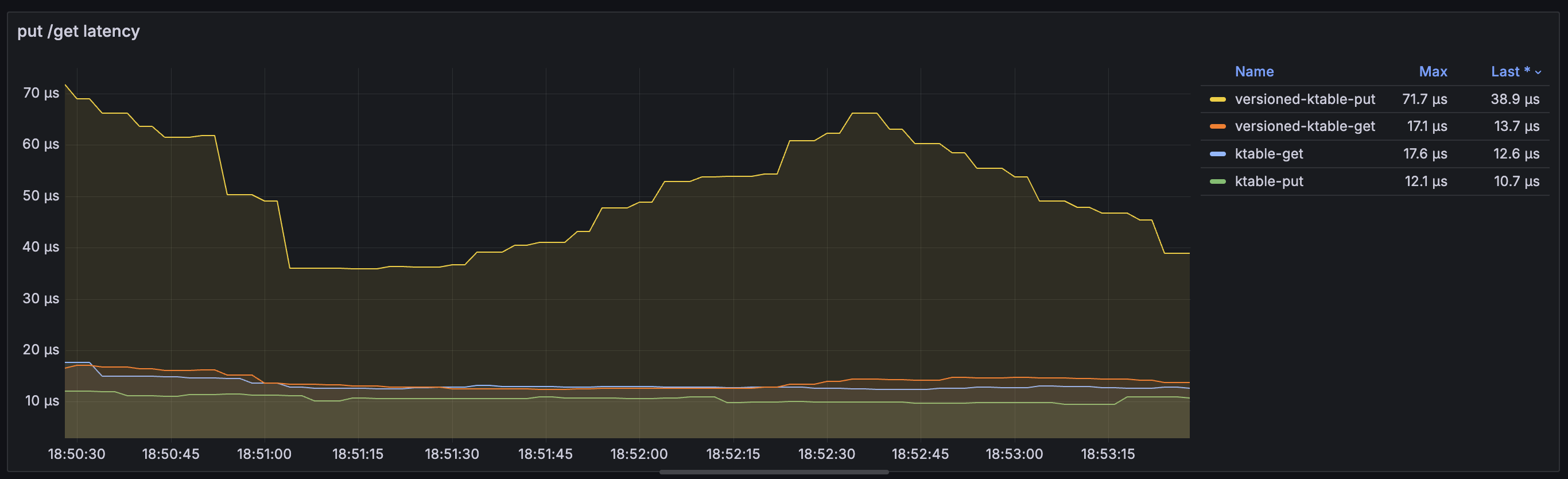
Put and Get Latency
In this demonstration, the put latency is higher, but get latency is almost identical to the non-versioned table.
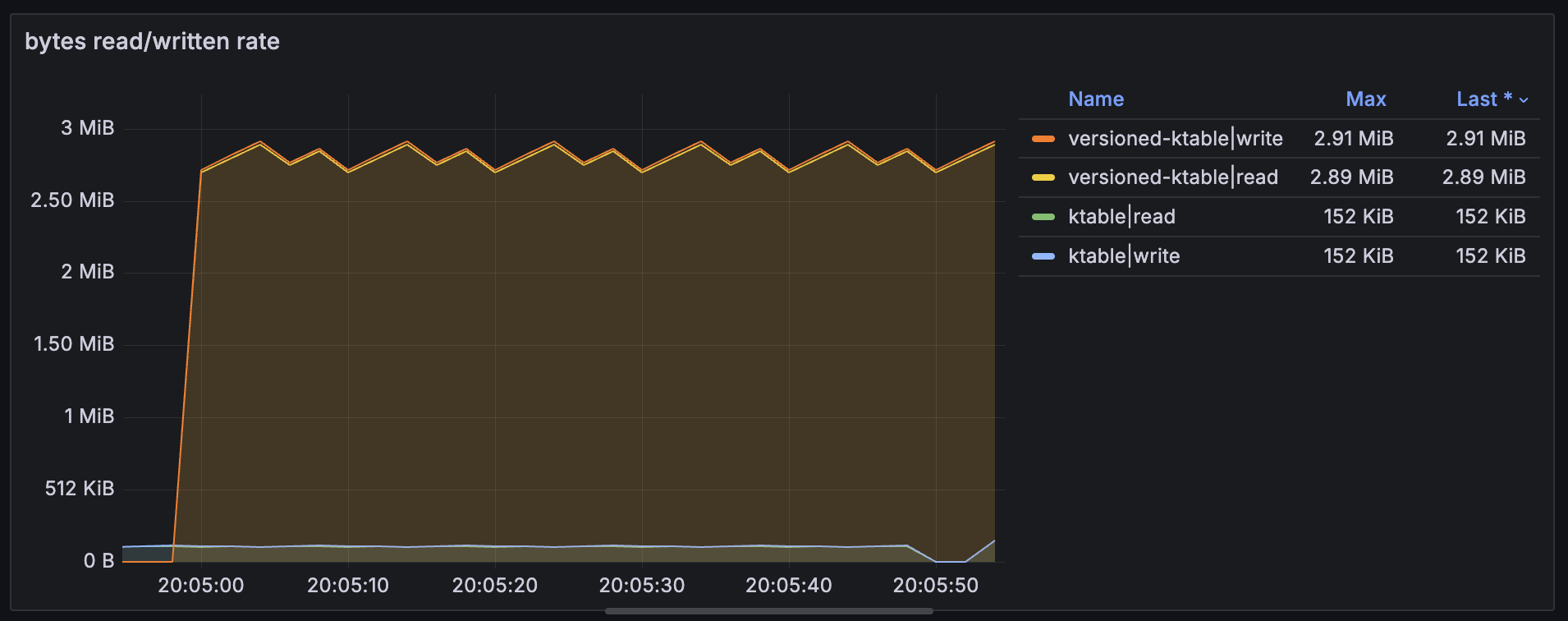
Bytes Read and Written
Here are the bytes read and bytes written by the demonstration application emitting events every second. Rate goes from 150KiB to 3MiB resulting in 20x more bytes read and bytes written every minute.
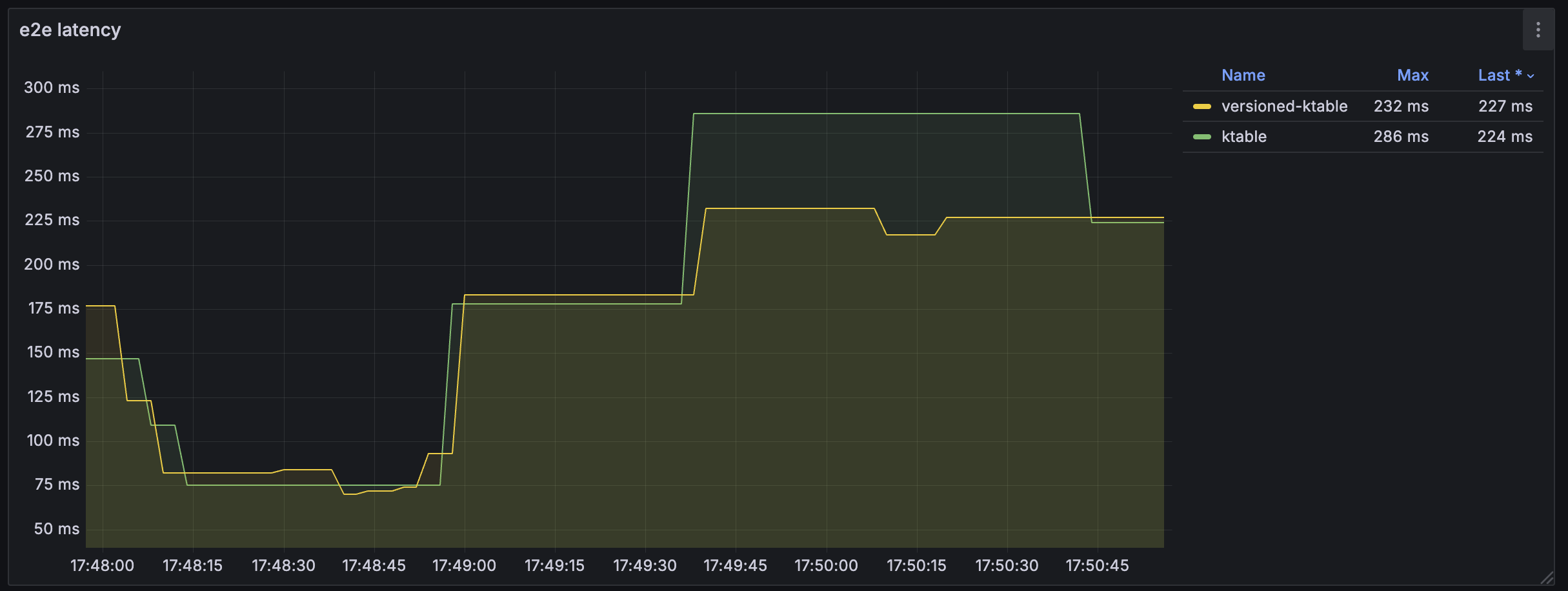
End-to-End Latency
The end-to-end RocksDB latenc metrics are nearly identica, but the version store typically stays a little higher.
Compaction and flush rates are higher, but that is expected if more bytes exist in the stores.
Shout-out to the Kafka Streams development team in their RocksDB key strategy.
Summary
If strict ordering is critical or if you need to replay stream data and ensure it joins to the same table state during reprocessing, versioned state stores is a great option. Be sure to understand your retention requirements and analyize for performance. Adjust settings as needed.
If you found this informative, more Bite-Size Kafka Streams tutorials are on the way. If there is a particular concept you would like to see covered, please let us know.