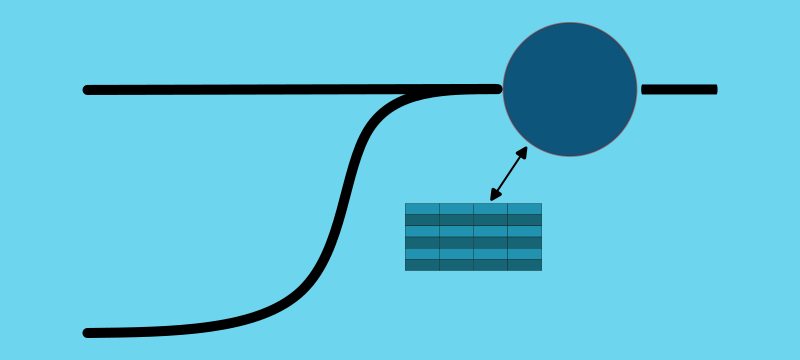
A demonstration of leveraging a stream-to-table join in Kafka Streams.
The Demo Application
The demo emits events from local processes and windows. This mirrors IoT patterns where device IDs repeat.
Events include an iteration sequence number to show which records join. This sequence number makes it easier to show which events are joined.
The app inspects the topology and builds the UI. You can build your own from the tutorials.
The source code is available on GitHub.
Stream-To-Table Join Algorithm
This tutorial defines the topology in StreamToTableJoin.
Steps
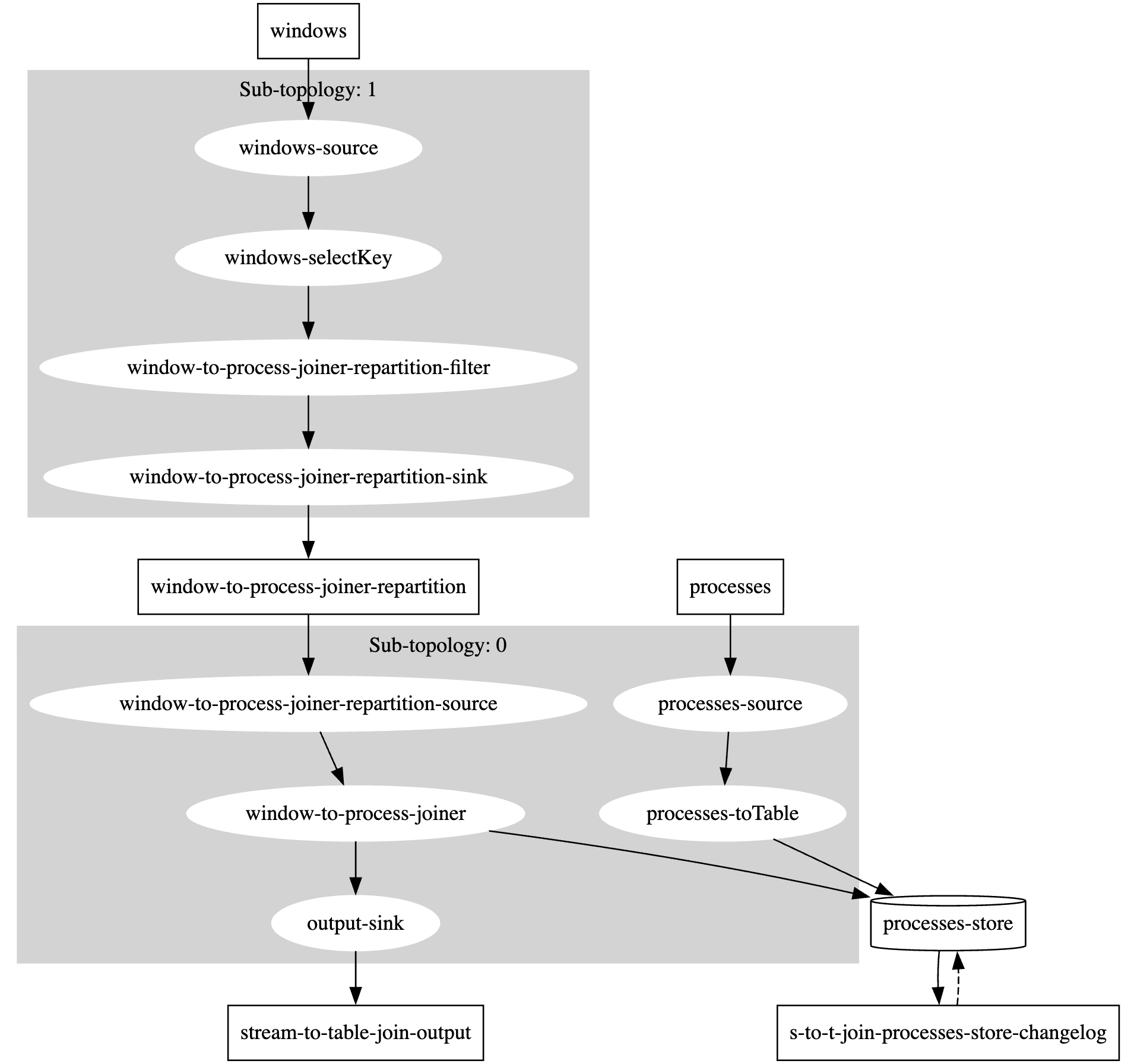
toTable- processes are already keyed byprocessId, so Kafka Streams simply creates the table.selectKey- windows are keyed bywindowId, so they cannot be joined to the process table; they must be rekeyed to theprocessId.join- ajoinfollowing aselectKeycreates a-repartitiontopic and separate sub-topologies; this allows for co-partitioning. The topology shows this.asString- this function has the stream element on the left-hand-side and the table element on the right-hand-side; the output can be any Java object, just ensure it can be properly serialized. In this topology, the actual join is performed by the underlying code of the Kafka Streams DSL. However, you can write topologies where you interact with state stores directly.
Source Code
  protected void build(StreamsBuilder builder) {

    KTable<String, OSProcess> processes = builder
            .<String, OSProcess>stream(Constants.PROCESSES)
            .toTable(Materialized.as("processes-store"));

    builder.<String, OSWindow>stream(Constants.WINDOWS)
            .selectKey((k, v) -> "" + v.processId())
            .join(processes, StreamToTableJoin::asString)
            .to(OUTPUT_TOPIC, Produced.with(null, Serdes.String()));
  }

  private static String asString(OSWindow w, OSProcess p) {
    return String.format("pId=%d(%d), wId=%d(%d) %s",
            p.processId(),
            p.iteration(),
            w.windowId(),
            w.iteration(),
            rectangleToString(w)
    );
  }

  private static String rectangleToString(OSWindow w) {
    return String.format("@%d,%d+%dx%d", w.x(), w.y(), w.width(), w.height());
  }
Stream-To-Table Join Topology
The topology shows how selectKey and join create a separate sub-topology through repartitioning, enabling co-partitioning by processId.
Demonstration
Here are examples of the stream-to-table joins in action.
Happy Path
The system produces events as expected.
windowevents are emitted, iteration=Nprocessevents are emitted, iteration=Nwindowevents are repartitioned to theprocessIdkey- the join occurs with events that are emitted at the same time (iteration)
This example shows 1 process with two windows creating two enriched records on the output topic. Notice how the partition changes from 1 to 0 as co-partitioning aligns the events.
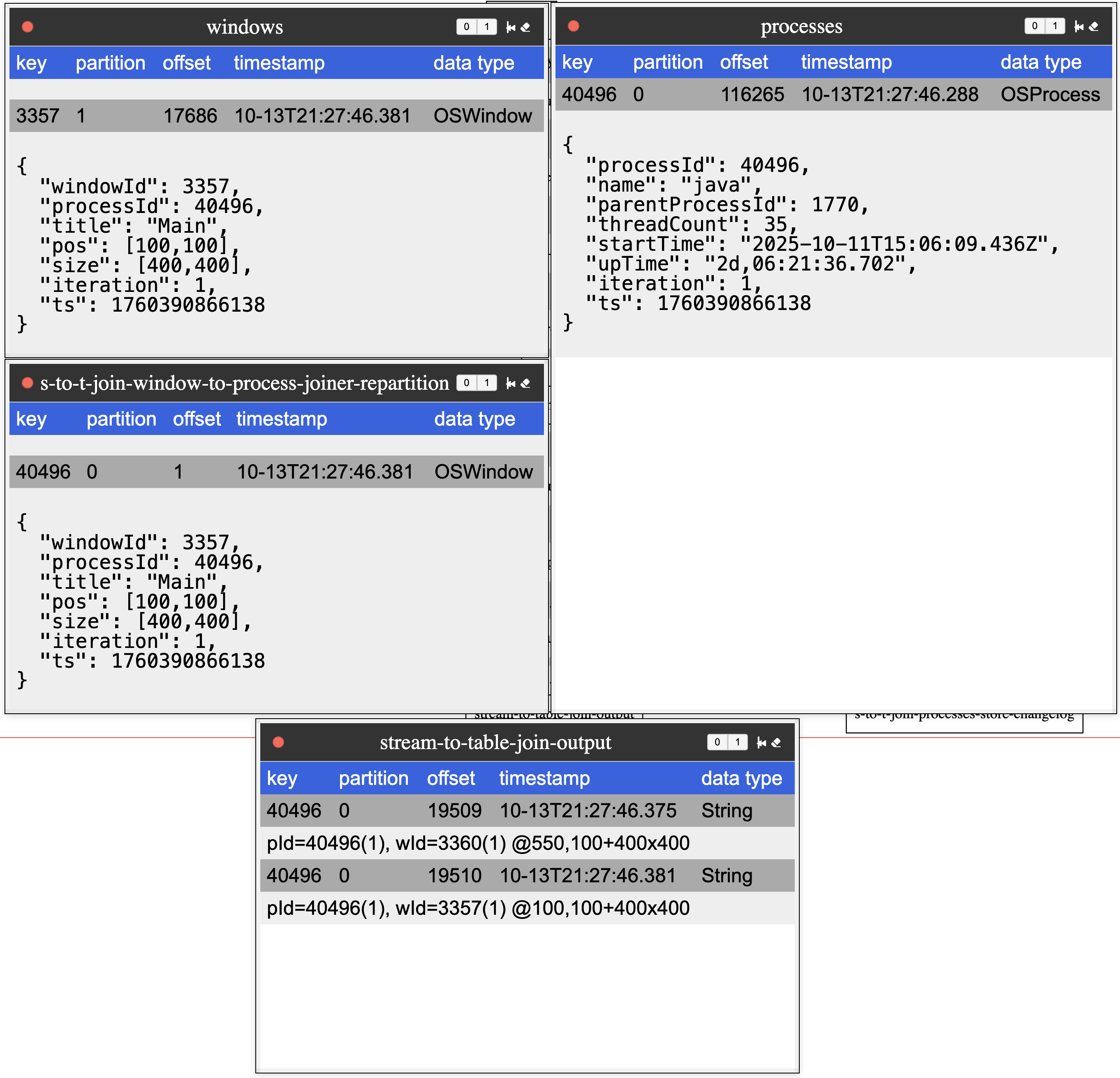
This is the expected baseline: joins happen within the same iteration, and the UI shows (iteration) for both inputs.
The output dialog shows (iteration) for each of the process and window events to provide a clear indication of which events are actually joined.
Slightly Late Arriving Processes
This scenario is unexpected. With window events published (and flushed) prior to publishing process events, one might expect window events to join with process events from the previous publishing, but that is not the case.
- the app first emitted
windowevents - then the publisher flushed buffers, ensuring the Streams application could process those events before the
processevents arrived - the app then emitted
processevents - the application joined
processandwindowevents - surprisingly, the application joined the
windowevents with the slightly delayedprocessevents from the same iteration
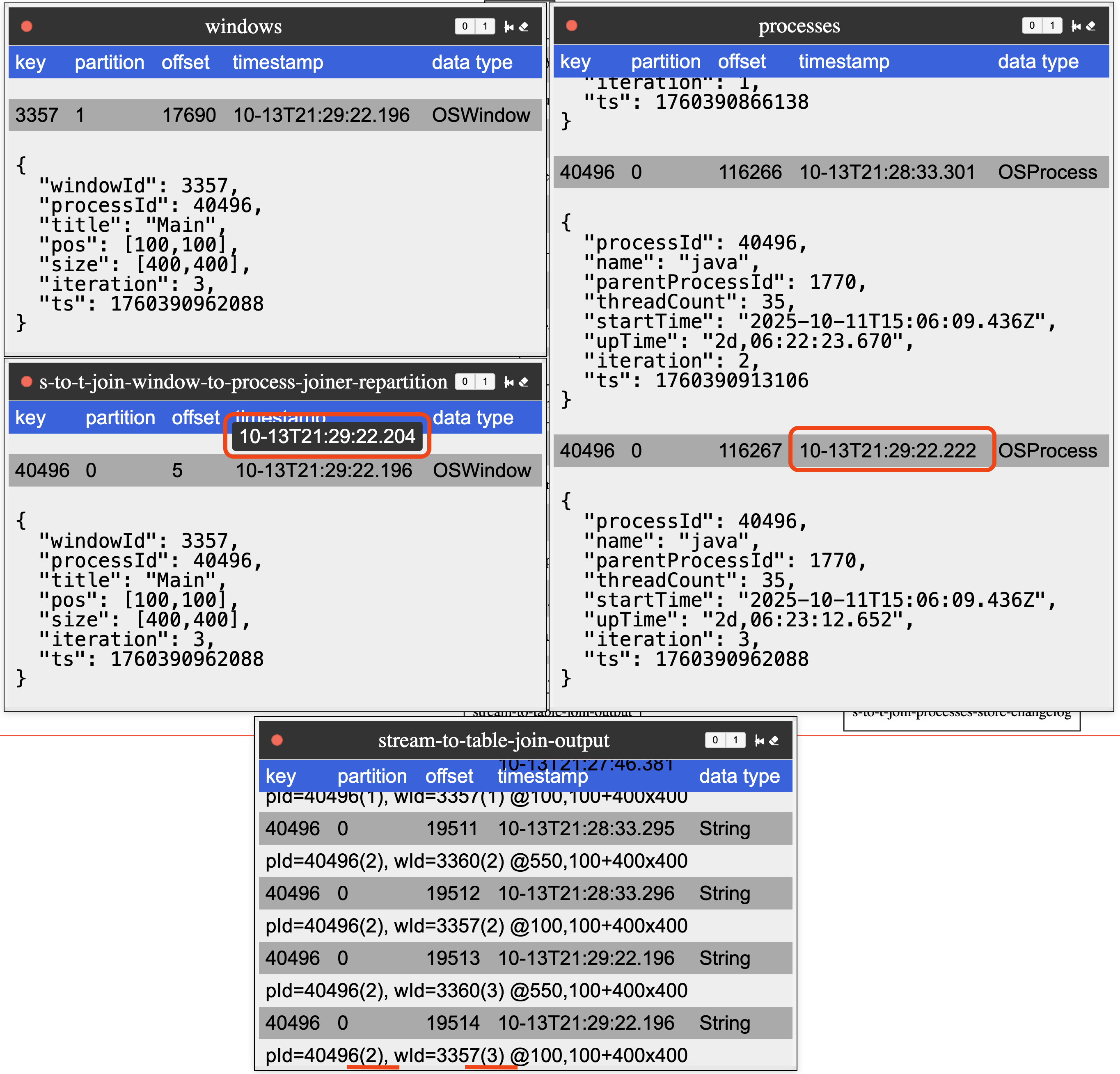
The image highlights the repartition topic’s publishing timestamp, and then shows the result of the join still with the process events from the same iteration.
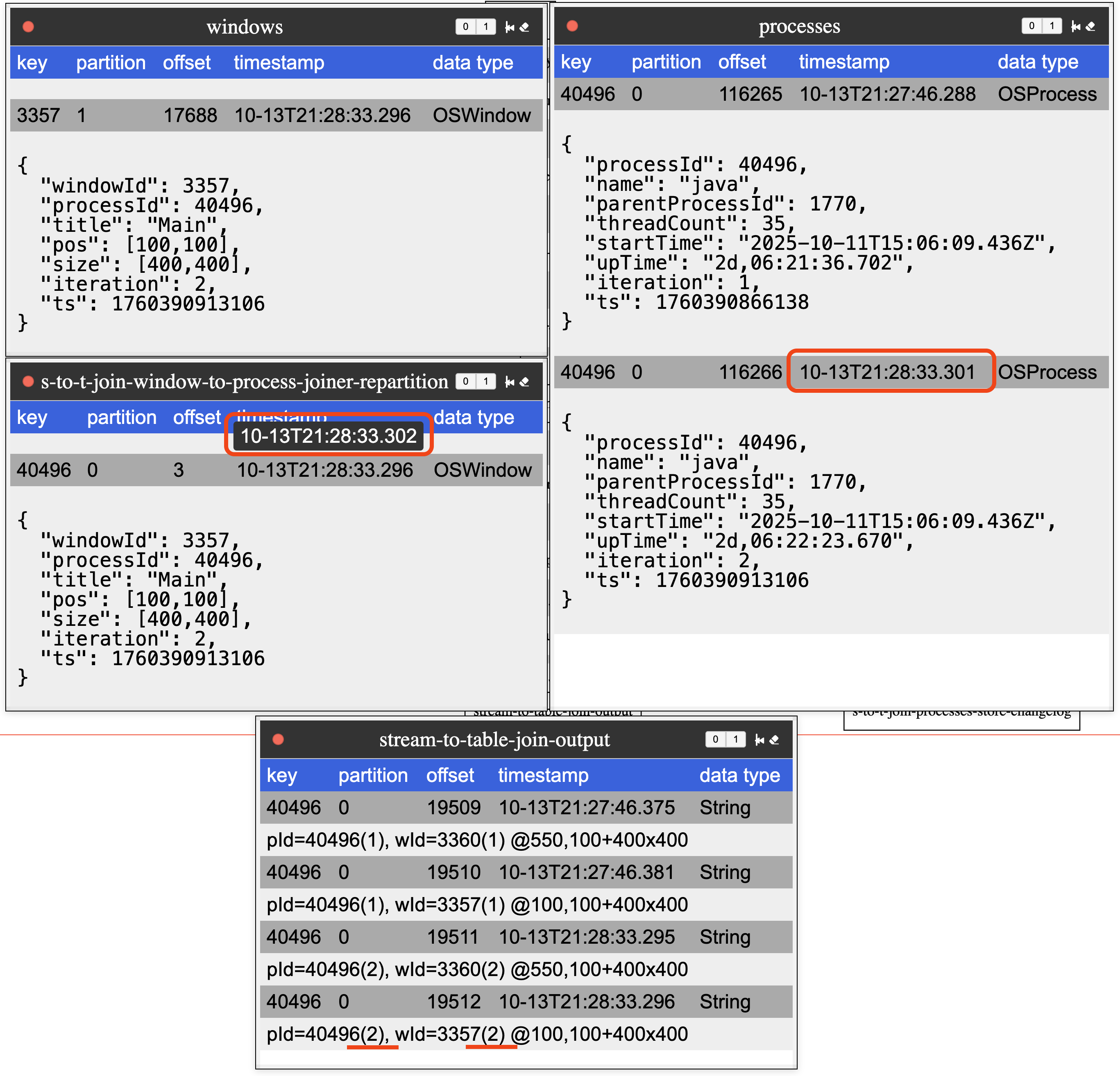
For time semantics to work, Kafka Streams does not (by default) change the event’s timestamp. The demo project adds a producer interceptor that adds a header with the publishing timestamp, which the UI displays (the pop-over highlighted on the timestamp of the window events). In this example, the window event arrives 0.001 seconds after the process event. Despite having an earlier timestamp, the process event updates the state store, allowing the window to join with it.
This demonstrates the scenario where window stream events join with later-arriving process events.
Since the repartitioned step has stream events actually arriving later, stream-time semantics are not enforced in the update of the process table.
Slightly Longer Late Arriving Processes
Another scenario occurs where process events arrive after the window events, this time with a slightly longer delay.
windowevents were emitted- publisher flushed buffers
- slight delay occured
processevents were emitted- joins occurred with
windowevents and earlierprocessevents
This image highlights the expected behavior. Here, the join occurs with the previous iteration of the process event, since the repartitioned window event
arrives prior to the process event.
This scenario represents the more expected behavior, where window events with early timestamps join with the previous process events that are already processed. Notice how the timestamp of the repartitioned topic is before the timestamp of the process topic.
Summary
For most stream-to-table joins, this behavior is not a concern. The idea is to enrich data with fairly static data, and if that data is slightly more current, it is not a deal-breaker. However, if your use case cannot tolerate this behavior, explore versioned key-value stores, which were introduced in version 3.5.
I hope you find this informative, and there will be more bite-size Kafka Streams tutorials to come. If there is a particular concept you would like to see covered, please let me know.